Pre-Inspection Agreements are sent to clients once you create a lead in InspectionPLUS. Clients can review and sign off on the agreement from any device. You will receive an alert when they sign the document.
What is a Pre-Inspection Agreement
These agreements are a contract between the inspector and client about the details of the services rendered. Pre-Inspection Agreements are sent when you create a lead.
The NRCIA provides companies with global pre-inspection agreements so you can hit the ground running. The type of pre-inspection agreement sent depends upon the inspection type selected when adding a lead.
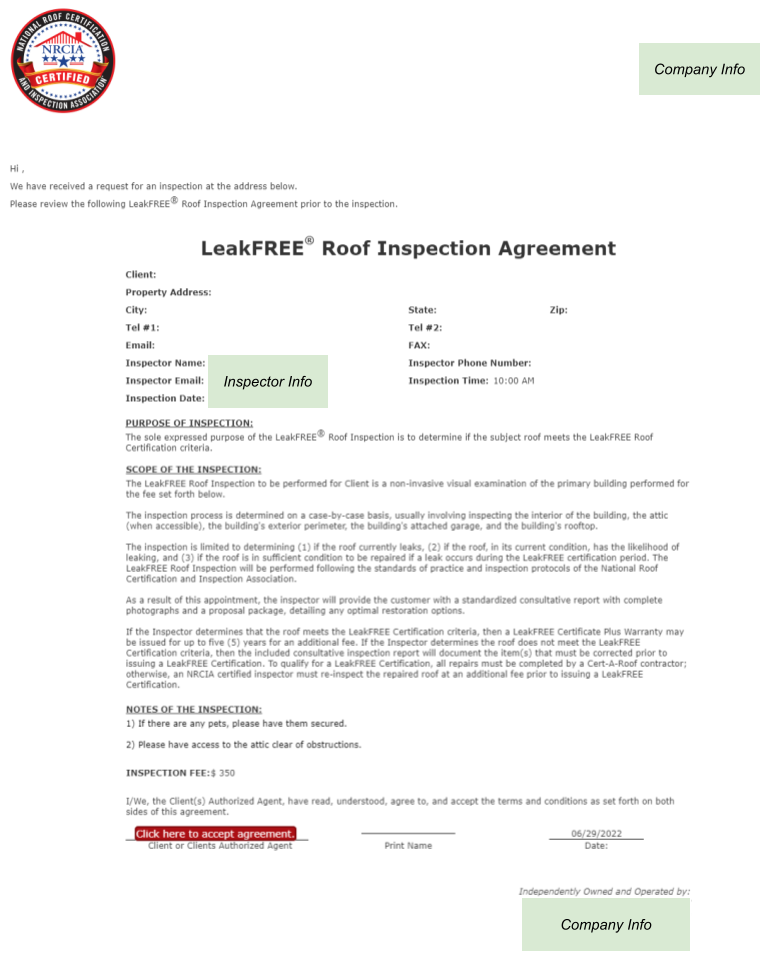
Each agreement contains information on
- What type of inspection will be performed
- Contact information for the inspector
- How much the inspection will cost
- The purpose & scope of the inspection
- Additional notes
Here is an example of a Pre-Inspection Agreement for a LeakFREE Roof Inspection
Customizing Pre-Inspection Agreements
As stated, the NRCIA provides standard agreements for each type of inspection. Members are allowed to customize the scope, purpose, and notes of the agreements. Please note that the logo and company info is pulled from your company profile, to edit those, edit your company settings.
You can only edit this when logged in as “Company”
To customize an agreement select the “Admin” icon. In the submenu, select “Pre Inspection Agreement.”

Duplicate Agreement
On this page, you will see all global agreements. You cannot edit the global agreements, but you can duplicate them to customize the content. To duplicate select the copy icon on the right-hand side of the document you want to customize
Agreement Information
Before you edit the purpose, scope, or notes, make sure the default information is correct
- Country – United States, unless you operate in a different country
- IsDefault – Yes. This will make it the default for your company
- Company Type: Roof Inspection
- Service Type: This will be whatever inspection agreement you are changing
- Company: Your company’s name
After confirming the information, you can edit the content, preview it, and add it to save the changes.
Signing Pre-Inspection Agreements
Clients can sign the Pre-Inspection Agreement in two ways.
Sign Via Email
Clients will receive the pre-inspection agreement when the lead is created. They can review and sign the agreement from the email sent.
If a client has not signed a pre-inspection agreement, you can resend the agreement again. To resend the agreement go to the Inspections page and open up the property in question. You can open an inspection by clicking the double right arrow on the right-hand side.

On the main page for the inspection, you will click “Resend Email” and a confirmation message will appear once it has been sent.
Sign On-Site
If the client doesn’t sign the agreement before the inspection date. You can have them sign on site, by using your phone or tablet to pull up the Pre-Inspection Agreement.
You will follow similar steps as resending an agreement. To sign on-site, go to the Inspections page and open up the property in question. You can open an inspection by clicking the double right arrow on the right-hand side.
On the main page for the inspection, you will click “Sign Agreement” and a new window will open up where the client can review and sign the document.
If you have questions or would like to walk through this together, please contact us at support@nrcia.org