The Document feature, allows you to upload pdfs to your company profile. This is helpful to build a library of resources for your inspection reports like credential documents, sales or promotional flyers, roofing product brochures, etc..
Follow these steps to access and edit your company documents. If you need help or run into trouble, contact support@nrcia.org
Documents
Navigate to the Document page to view the current categories and accessible files.
Categories
On the left-hand side, you will see the document categories. These are your folders to store and organize your documents. To view each category’s contents, click the double arrow to the right of the category name
Adding Documents
On the Document page, you see all current documents in their respective categories. You can upload documents to your company to create a pre-set library. To upload new documents, make sure your role is set to company and follow these steps.
Select Desired Category
Note: The category “Company: Report Flyers” is unique. Any documents added to this category will be automatically added to every report.
Click “+Add Document”
Add Info & Upload
Here is a quick guide for the form fields to help you out:
Set As Default: If changed to Yes, you will need to specify which reports it will always be added to.
Is Active: Change to yes to be able to use this document
Set As Admin: 99.99% of the time this should be set to No. Admin documents are not accessible for inspectors or inspection reports.
Is It For Estimate: If changed to yes, this document will always be auto-inserted if there is an estimate/proposal in your report.
Tips for Document Uploads
There is no limit to the number of documents you can upload. Here are a couple of helpful tips for the proper formatting of your documents.
Documents should be portrait oriented not landscape
Documents should be high quality for maximum readability
Documents should be 8.5 x 11 inches in dimensions (Normal Printer Paper)
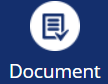
Example Document from NRCIA Member
This document is an example of a Company Report Flyer. NRCIA Authorized Company, Cert-A-Roof, adds this flyer to every report. You can use documents to promote your credentials, sell additional services, or highlight other offerings.